See when
you’re working.
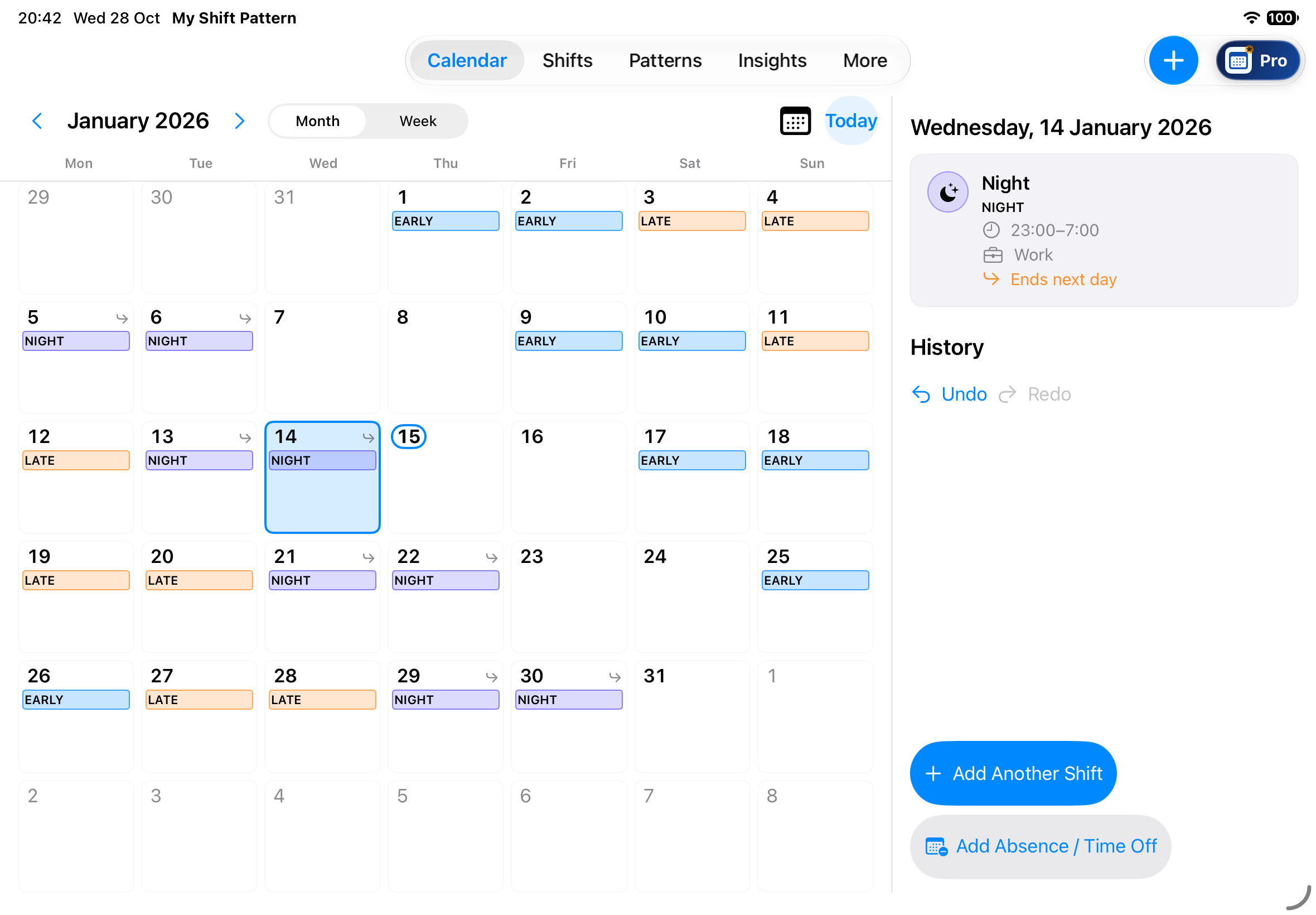
Switch between Month and Week to see shifts, rest days and time off together.
- Multiple shifts on the same day
- Overnight and split shifts
- Public holidays and basic reminders
For iPhone & iPad · Preparing for launch
A shift planner for iPhone and iPad. Add shifts, build a repeating rota and check your working hours.
Core planning will work offline, without a cloud account.
Not yet available to download or buy. Initial UK launch: workers aged 16 and over.
Individual shifts or repeating rotas
Early, late and overnight work
Core planning included in Free
Your working week, organised
Plan a regular rota or a changing week. These local planning tools will be included in Free.
Switch between Month and Week to see shifts, rest days and time off together.
Choose your own shift names, times and colours, and add notes when you need them.
Add a one-off shift, copy it to other dates or schedule several dates together.
Check basic hours and statistics, or use a widget for a quick view of your schedule.
Repeating rotas · Included in Free
For example: two early shifts, two late shifts, two nights, then two days off. Save your pattern, apply it to dates and review the result.
Choose the shift names and times you use.
Put shifts and rest days in the order you work.
Apply it to dates, check the calendar and adjust individual shifts.
A closer look
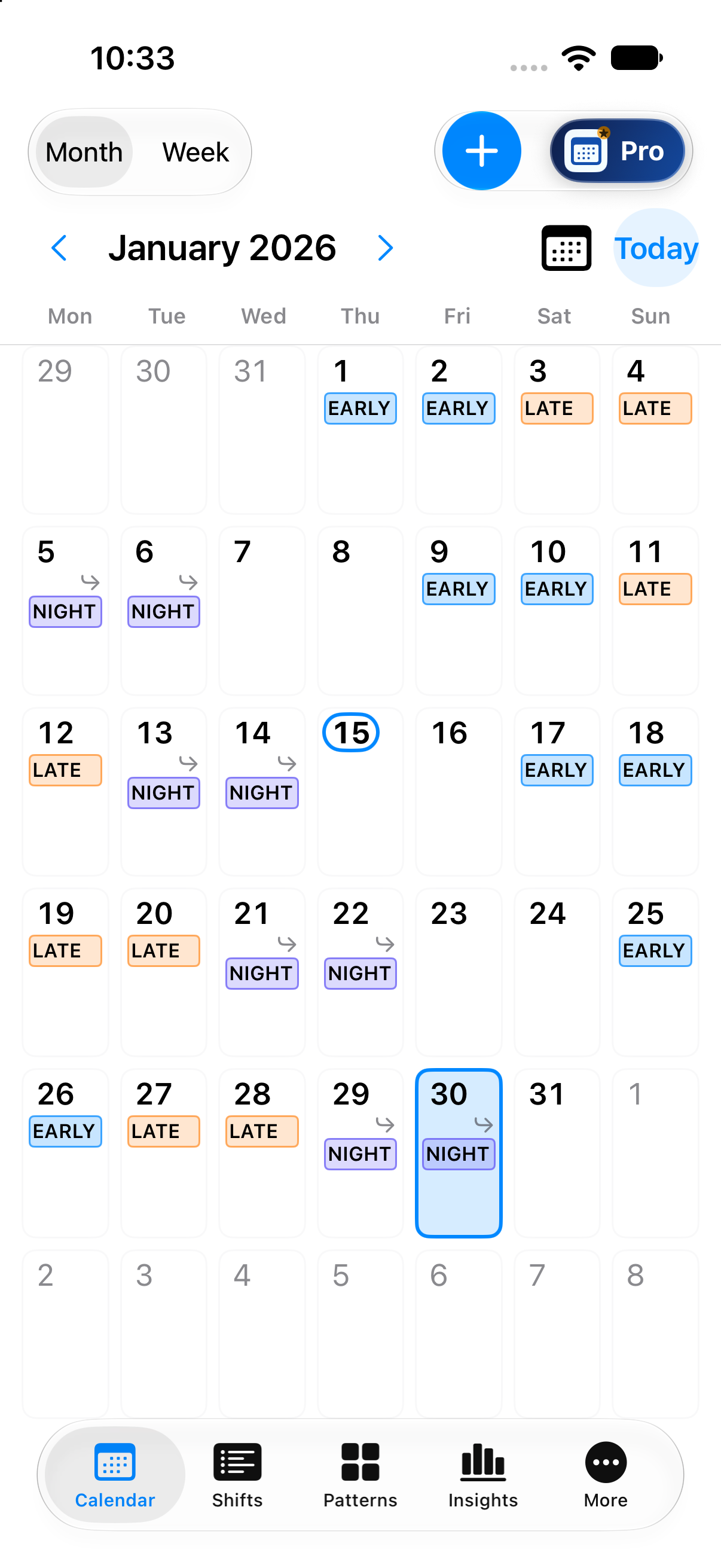
Build a pattern, check the dates in Calendar and review your hours in Basic Insights. These current app captures use made-up data.
See 24 made-up shifts across January 2026, using EARLY, LATE and NIGHT to show your working days.
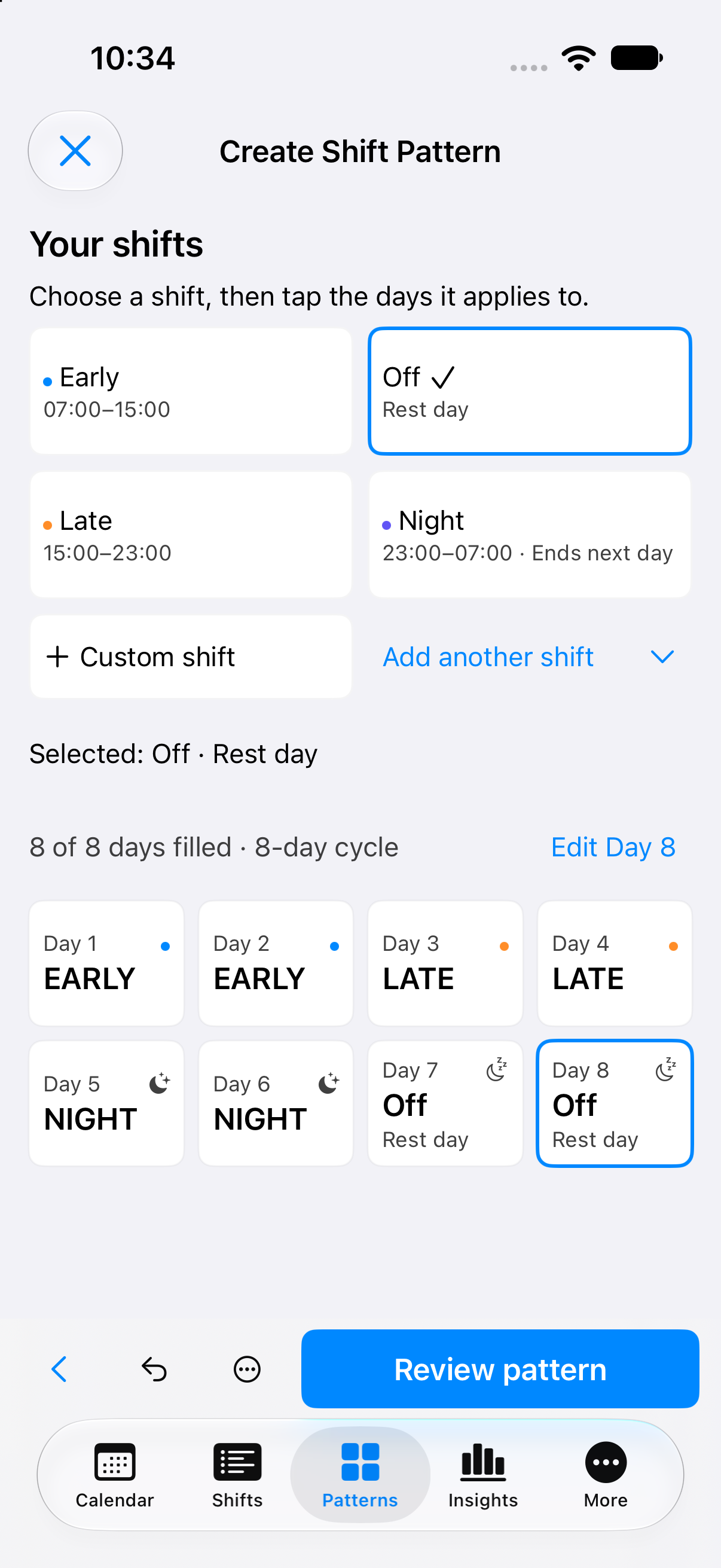
Arrange the same shift types into an eight-day cycle: two EARLY, two LATE, two NIGHT and two rest days.
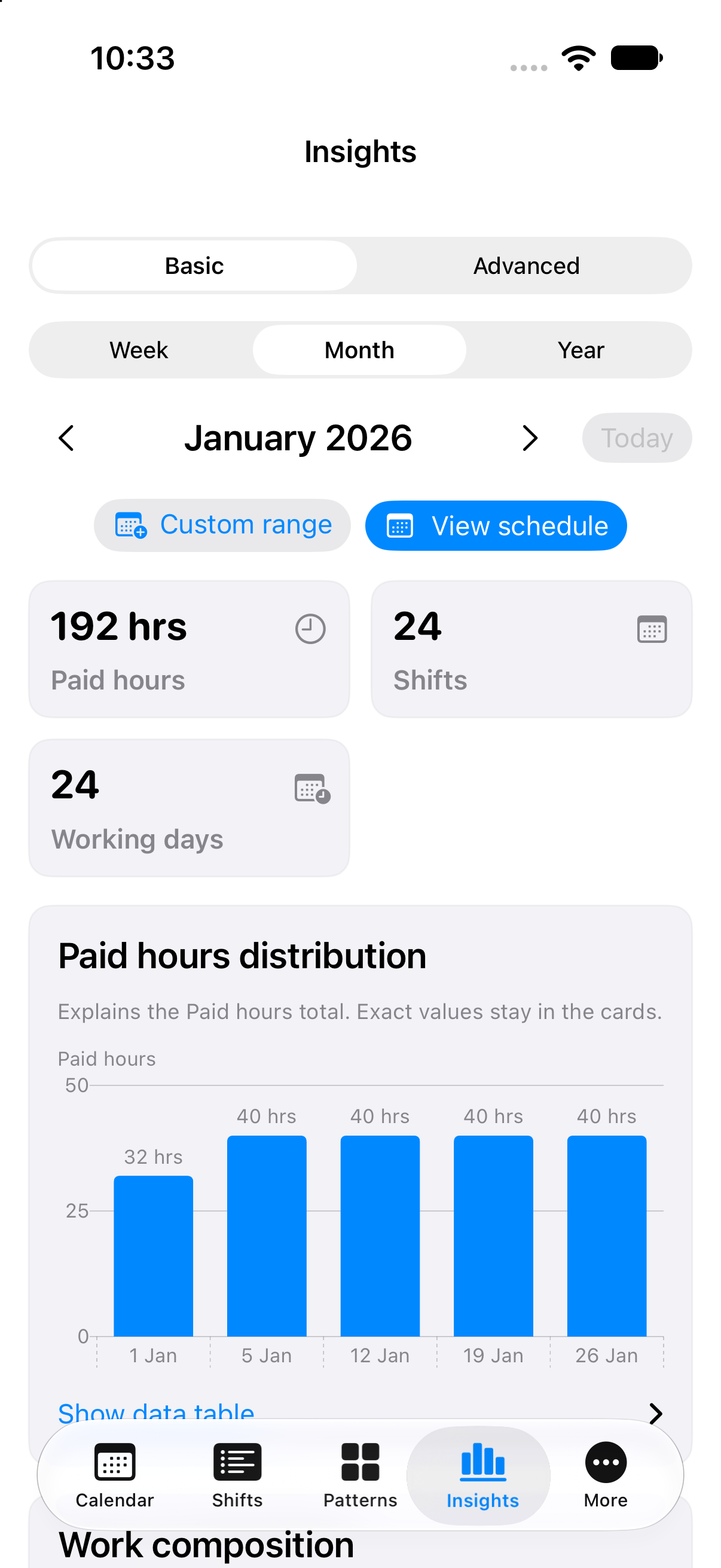
Review the January calendar’s totals: 24 eight-hour shifts and 192 paid hours, with a weekly hours chart.
All three are genuine current development captures from iPhone 17 using made-up data. Status-bar details are hidden. These show phone layouts; iPad will also be supported. Layouts may change. Not all launch features are shown.
Core planning · Free
A wider calendar, with room for the selected day’s details. Core local planning is included in Free on iPhone and iPad.
One complete Pro offering
Everything in Free, plus ad-free use and the complete toolkit below. Monthly, Annual and Lifetime Pro will include the same features.
Pay figures are estimates, not a payslip or guaranteed employer pay.
Local backup files are unencrypted; cloud content is encrypted before upload.
Cloud, when you choose. Backup and synchronisation will start switched off, with a separate choice for each. Signing in alone will not start an upload. Core local planning will remain available without an account.
Cloud timing will depend on connectivity and when iOS allows the app to run. Device-calendar events and selections will stay local and will be excluded from cloud backup, sync and sharing.
Pro in the current app
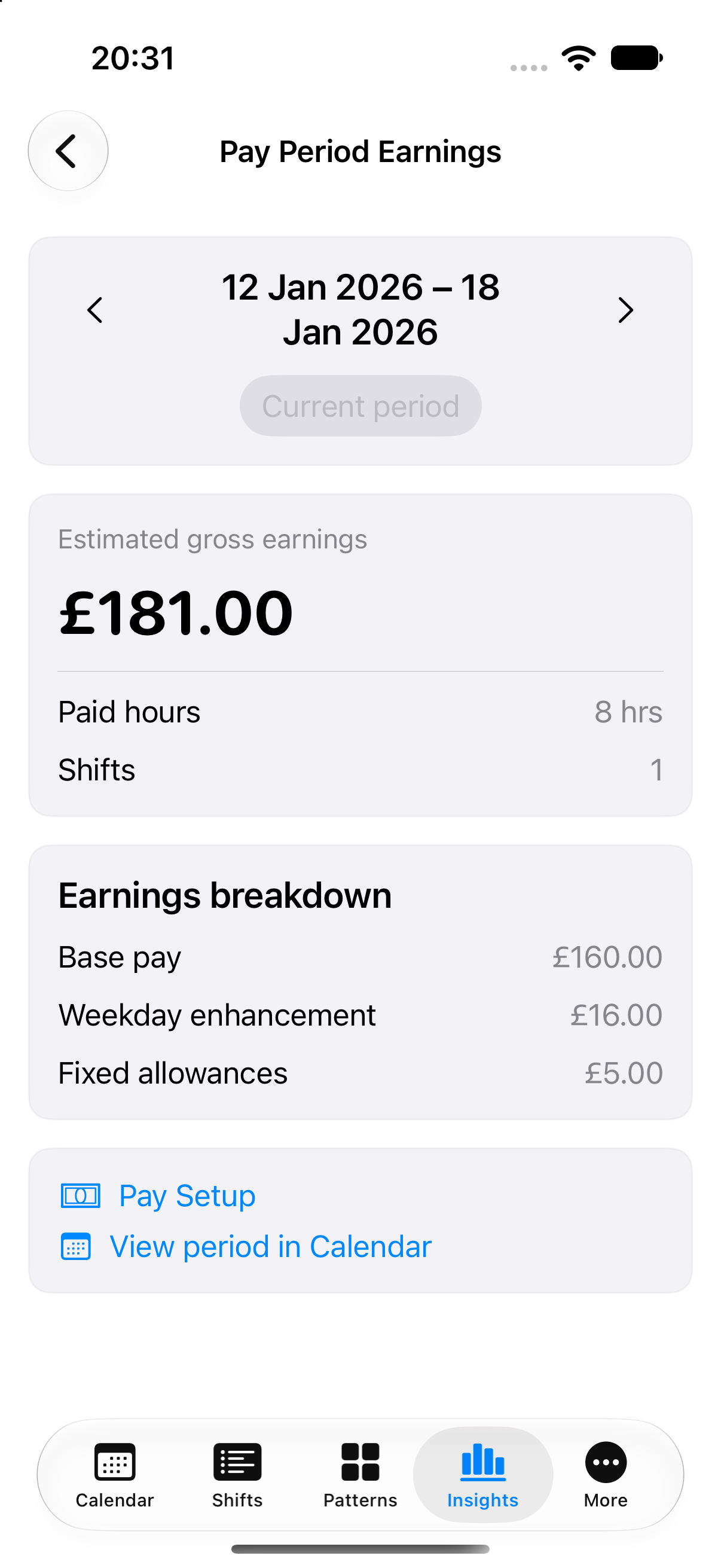
A genuine current development capture using made-up shifts and rates. Not all launch features are shown.
Pro · Pay Period Earnings
See how pay rules turn shifts into an estimated gross-pay breakdown. This separate made-up example shows £181 for one eight-hour shift. See the pay calculation
Estimates help you plan. They are not a payslip or a guarantee of what your employer will pay.
Planned UK pricing
These are planned prices and offers, not products available to buy. The actual price and any offer will be shown through the App Store before purchase.
Monthly Pro
£0.99/ month
Monthly subscription.
Renews automatically unless cancelled.
Annual Pro
£7.99/ year
Seven-day free trial for eligible Annual Pro customers, then £7.99 per year.
Renews automatically unless cancelled. Apple determines trial eligibility.
Planned · annual offer onlyLifetime Pro
£29.99once
Planned one-time Full Pro purchase. Full purchase terms will be provided before it becomes available.
PlannedMonthly, Annual and Lifetime Pro will include the same Full Pro features, including the cloud features. The seven-day trial is planned for eligible Annual Pro customers only. No trial is promised for Monthly or Lifetime Pro. Remove Ads is separate and will not unlock Pro tools or Pro cloud features. Read the planned purchase terms