My Shift Pattern Support
Help & support
Quick answers for planning, purchases and your data. If you need a hand, get in touch.
Contact support
Let’s help you
move forward.
support@myshiftpattern.comSupport queries will be answered as soon as possible.
Privacy and personal-data questionsBefore you send
When you contact us
Tell us what happened, which app version you’re using and your device model. If an example would help, replace real names and other private details with fictional ones. Before sending a screenshot, crop out or fully cover private information, such as names, email addresses or calendar notes. Please do not send passwords, sign-in codes, recovery information or details that could identify patients or other people.
Your first pattern
Start with three simple steps.
Core local shift and pattern planning will work offline and will not need a cloud account or website login.
Set up your shift types
Choose the names and times you use for work. Custom shift types and notes are part of Free.
View full screenshot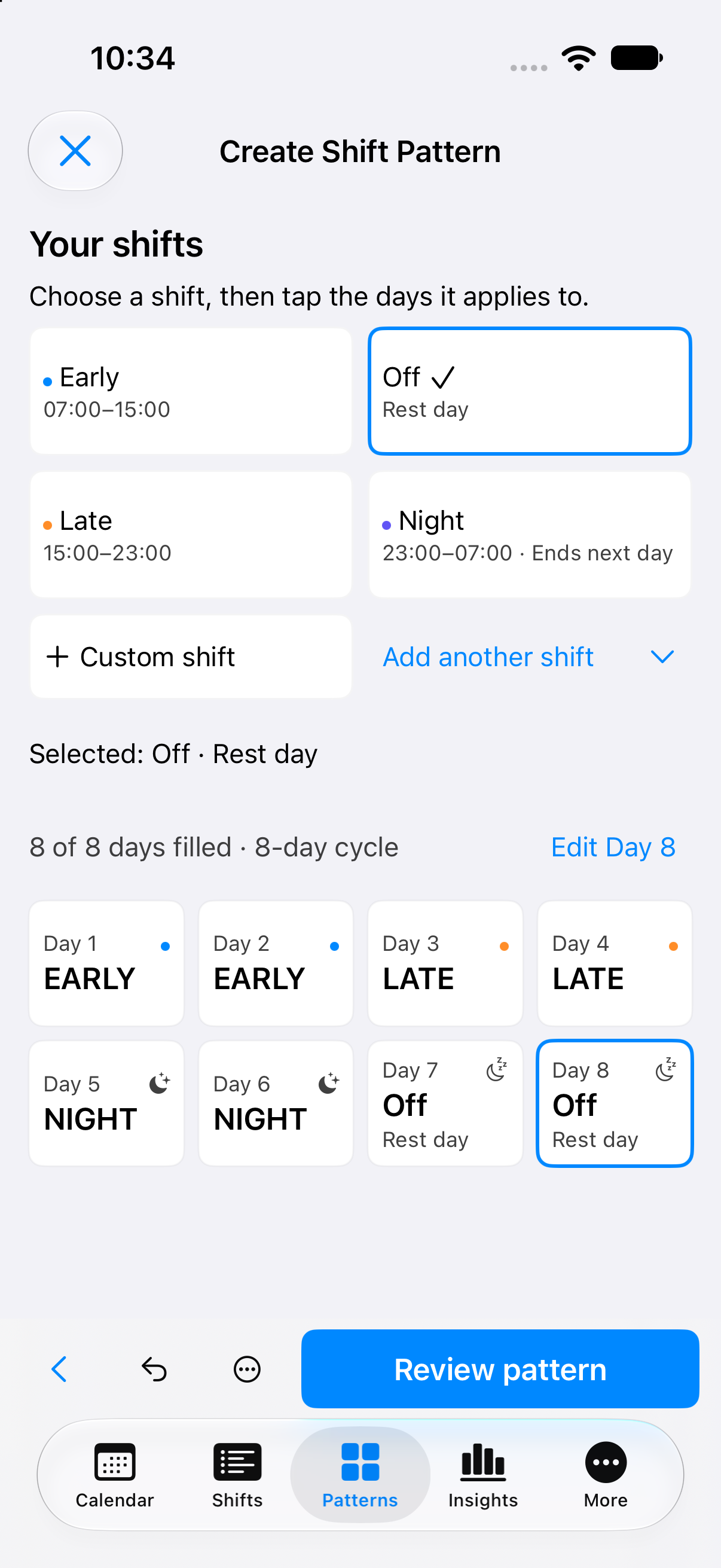
Example shift choices and their times. Build a repeating pattern
Arrange your shifts and rest days into a pattern you can save and reuse.
View full screenshotTwo Early, two Late, two Night and two rest days. Apply it and review
Choose the dates you need, check the calendar, then make any individual changes.
View full screenshot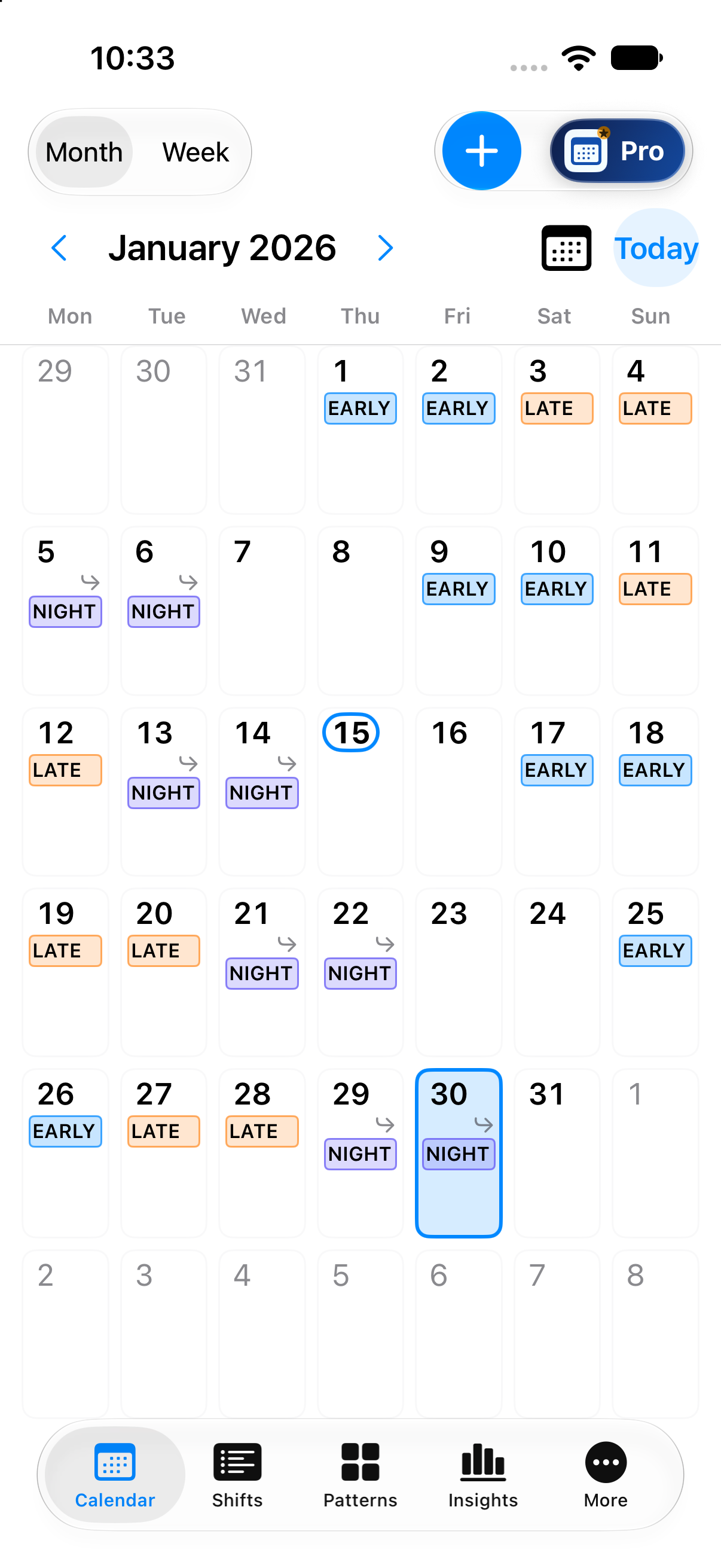
Example calendar: review individual shifts and dates.
Genuine current development captures with made-up examples. These focused views show the shift choices, a pattern and the calendar; not all launch features are shown. Open a full screenshot to see all its details.
Quick answers
Common questions
Choose a question to see the answer.
Using your local schedule
Do I need an account or an internet connection?
Core local shift planning and saved shift patterns will work offline without a cloud account. You will not need to log into this website to use your local schedule.
Keep your device and local data protected. Using the app offline does not create a cloud backup.
Can I use a repeating rota and change individual shifts?
Yes. Reusable custom patterns, ordinary shifts, copy and paste, and bulk scheduling will be included in Free at launch. You will be able to review the calendar after applying a pattern and make individual changes.
Does Free limit saved rotas or advance planning?
Free, Remove Ads and Pro will have the same limits on saved rotas and advance planning for your primary job. You can save multiple rotas, record future shifts and apply a repeating rota without an end date. Pro will be required for additional jobs and work calendars.
A rota cycle can contain up to 366 days. When you choose an end date, one application of a rota can cover up to 3,660 days. These limits apply to all three options. They limit the length of a repeating cycle and the dates covered in one application; they do not set an earlier future-planning cut-off for Free.
Does My Shift Pattern support iPad?
The app will support iPhone and iPad. At launch, Pro will include automatic synchronisation between your iPhones and iPads using the same account. If sync stays enabled, changes made offline will synchronise when your connection returns. Timing will depend on connectivity and when iOS allows the app to run.
Can someone view my calendar without Pro?
At launch, Pro users will be able to invite others to view selected calendars and manage invitations and access. Viewers will sign in to the invited account and will not need Pro. Free and Remove Ads users will be able to view calendars they are invited to, without editing them.
How do other calendars fit in?
Device-calendar display and Apple Calendar export will be Pro features using Apple’s EventKit for calendars available on your device. This integration will stay separate from direct Google account integration and Pro cloud synchronisation.
External calendar events and calendar selections will always stay local and will be excluded from cloud backup, synchronisation and sharing. See the privacy information for more detail.
Purchases and subscriptions
What is the difference between Remove Ads and Pro?
Remove Ads will be a separate purchase that removes adverts. You will keep the features and limits of Free; it will not unlock Pro tools or Pro cloud features.
Monthly, Annual and Lifetime Pro will include the same full Pro features and ad-free use at launch. Explore the complete Pro feature catalogue.
What are the planned Pro prices?
The planned UK prices are £0.99 per month, £7.99 per year, or £29.99 once for Lifetime Pro. A seven-day free trial is planned only for eligible Annual Pro customers, followed by £7.99 per year. Monthly and annual subscriptions renew automatically unless cancelled.
These products and offers are not yet available to buy. Apple determines trial eligibility. Read the planned prices and purchase terms.
I already have an App Store purchase. How can I restore it?
Use the app’s Restore Purchases option where available. If you need help, email support with a description of the issue; please do not send payment-card details, passwords or sign-in codes.
Deleting local app data does not itself cancel an App Store subscription. This website cannot cancel a subscription for you.
Account & data
Is local file backup the same as cloud backup?
No. The current local Pro backup tool creates a separate file that you save yourself. That file is not encrypted, so keep it somewhere you trust. At launch, Pro will also include separate encrypted cloud backup and restore.
Cloud backup and synchronisation will start switched off. You will choose separately whether to enable each; signing in alone will not start an upload.
Can I delete an account or my app data here?
This website cannot delete your app data, close a cloud account or cancel an App Store subscription. At launch, cloud-account and data controls will be available in the app.
Read Account & data before considering an erase action. For questions about your data, contact My Shift Pattern Support.
What happens to my data if Pro ends?
Losing Pro will not delete your saved scheduling data. Local use and your privacy rights will remain separate from a paid subscription.
At launch, backup history will keep up to seven completed backups: the latest successful backup and up to six earlier backups from the last 30 days. While Pro and your account remain active, the latest successful backup will be kept even if older than 30 days. When Pro ends, new cloud backups and synchronisation will stop; recovery and export of retained backups will remain available for 30 days without renewing Pro. See the cloud privacy approach and account and data guidance.
Still unsure? Start with what you were trying to do and what happened. We’ll help you find the next step.
Email My Shift Pattern Support